
Ganit (गणित) is Sanskrit for "mathematics": the sums, conversions and currencies, answered as you type.
ganit is the calculator and converter for Vyom: one keyboard-driven panel that opens instantly, with live data, a preview and a key for everything. It runs on any compositor with the layer-shell protocol (sway, Hyprland, river, niri, Wayfire, labwc…). In Vayu, the desktop it was built for, it replaces wofi-calc.sh (a prompt, then a second wofi for the result).
#Features
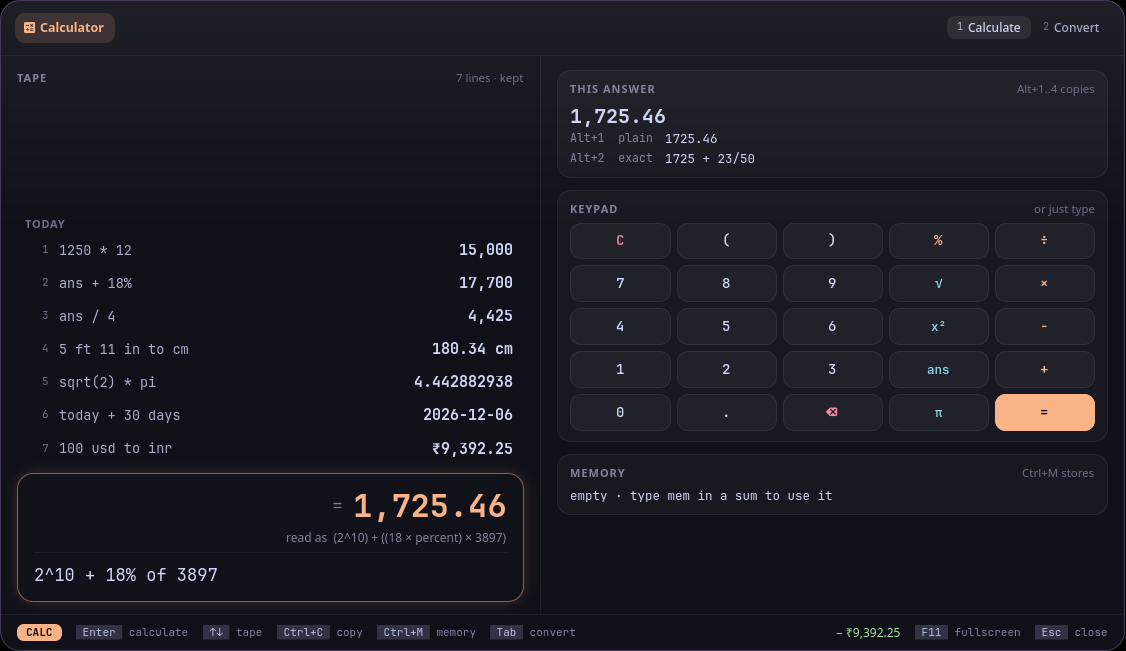
Calculate (vyom ganit): a calculator with a paper tape, that stays open like a real one.
- Answers as you type, through qalc (libqalculate): arithmetic, functions, percentages (
18% of 3897,3897 + 18%), units (5 ft 11 in to cm), currency (100 USD to INR), dates (today + 30 days), bases. Enterkeeps the answer on the tape and stays open: the box clears for the next sum, andEsccloses. Start a sum with an operator (+ 100,× 2) and it carries on from the last answer, like a desk calculator;ansis the last answer andmemthe one saved withm.- A tape you can go back through: the last 300 sums, grouped by day and kept between sessions. In normal mode
j/kwalk it,yycopies a line's answer,dddeletes one (ubrings it back), andEnter(or a double-click) puts it back in the box. - One big answer that says how it was read: "read as (18 × percent) × 3897", so a misread is obvious at once. Digits are grouped and money is rounded to 2 decimals (₹9,494.51).
- The other forms beside it: plain (for pasting), exact (a fraction, qalc's full digits), hex, binary;
Space y p/x/h/bcopies one. - A keypad you can click, while the keyboard keeps working: the focus never leaves the box.
- Half-typed input doesn't jump around: while the box ends in an operator (
2 +), the last answer stays, dimmed, "waiting for more…".
Convert (vyom ganit convert, or L from Calculate): a two-sided converter.
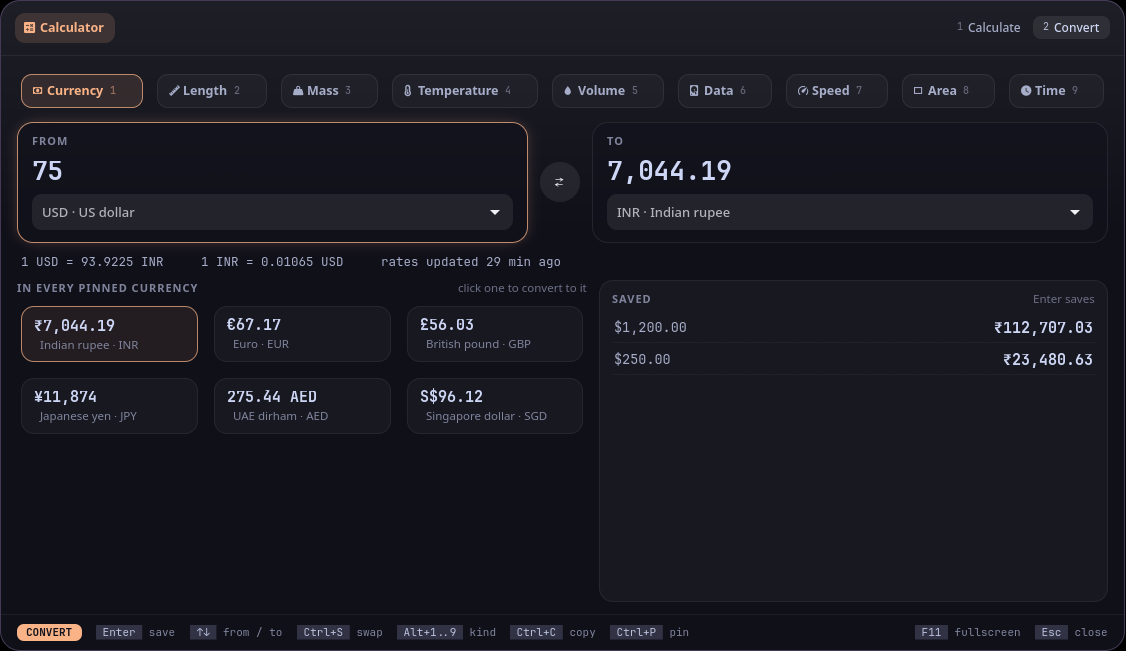
- From and To, side by side: type in either (
j/kmoves between them) and the other follows;h/lchanges that side's unit,Space e f/Space e tpicks one from the list, andsswaps them. - Every kind has its own colour: currency, length, mass, temperature, volume, data, speed, area, time;
[/]steps through them,Space gand a letter jumps to one. - The rest at a glance: the same amount in every other unit, or every pinned currency (
Space m ppins or unpins one); click one to make it the target. Entersaves the conversion to a list under it (and to the calculator's tape); the panel stays open.- Exchange rates you can trust: their age is always shown, and turns yellow past two days. They update once a day in the background (not again for an hour if offline), and
Space rupdates them now.
Both: keyboard first, with vim's modes and a Space leader (the footer shows the keys, ? all of them), Space u f (or F11) makes it fullscreen, and the panel never freezes: qalc runs in the background.
#Install
#Requirements
- Vyom 0.7 or newer (Python 3.11+, PyGObject, GTK 4, gtk4-layer-shell, a Nerd Font)
qalc
#Install
git clone https://github.com/Theyashsawarkar/ganit ~/.local/share/vyom/plugins/ganit
vyom reload           # pick it up (or log out and in)
vyom ganit            # open it; run it again to close
Give it a key in your compositor, e.g. sway:
bindsym $mod+<key> exec vyom ganit#Update and uninstall
git -C ~/.local/share/vyom/plugins/ganit pull && vyom reload     # update
rm -rf ~/.local/share/vyom/plugins/ganit && vyom reload # uninstall#Usage
Open it with vyom ganit (or your key), or straight on Convert with vyom ganit convert. Calculate opens in insert mode, so you can type a sum at once (Convert opens in normal mode, so a stray key changes nothing); Enter runs it and keeps it on the tape, and the panel stays open.
Keys work like vim. In insert mode, keys type: only Enter (run or save) and Esc (to normal mode) do something else. Every other key belongs to normal mode:
j/kmove andigoes back to typing.- A count goes first (
5k,3l). Spaceis the leader: after it, a strip shows what comes next (Space ttabs,Space ycopy,Space vmemory,Space gkind,Space dclear…). The letters are Vayu's shared ones: the same group means the same thing in every Vyom tool.?shows every key of the tab you're on.Escin normal mode unpicks a tape line, then closes the panel.
Tabs: H / L (and vim's gt / gT, Tab), or Space t c / Space t v. Keys that moved in v0.5 say where they went for one release.
Vyom's keys work too (every vim tool has them): ? and Space ? list every key, Space Space is the palette, H / L switch tabs, q closes, Space u f is fullscreen.
Insert mode (typing), Calculate
| Key | Action |
|---|---|
Enter | Run the sum and keep it on the tape; stays in insert mode |
Insert mode (typing), Convert
| Key | Action |
|---|---|
Enter | Save the conversion to the list; stays in insert mode |
Normal mode, both tabs
| Key | Action |
|---|---|
i | Enter insert mode to type (Esc goes back to normal) |
a | Enter insert mode at the end of the box |
Normal mode, Calculate
| Key | Action |
|---|---|
j | Move down the tape (a count moves further: 5j; past the end, back to the box) |
k | Move up the tape (a count moves further: 5k) |
g g | Jump to the first tape line |
G | Jump to the last tape line |
Enter | Run the sum and keep it on the tape (a picked line: put its sum in the box) |
= | Run the sum and keep it on the tape |
y y | Copy the answer (the picked line's, else the live one) |
Y | Copy the sum with its answer (12 + 5 = 17) |
p | Paste the answer at the end of the box |
P | Paste the picked line's sum into the box, replacing what's there |
x | Delete the last character in the box |
D | Clear the box |
c c | Clear the box and enter insert mode |
S | Clear the box and enter insert mode |
d d | Delete the picked tape line, else the last (u brings it back) |
u | Undo the last deleted tape line |
m | Save the answer to memory (mem in a sum uses it) |
Normal mode, Convert
| Key | Action |
|---|---|
j | Move to the To amount |
k | Move to the From amount |
h | Switch this side's unit to the previous one (a count: 3h) |
l | Switch this side's unit to the next one (a count: 3l) |
[ | Switch to the previous kind (currency, length, mass…) |
] | Switch to the next kind |
s | Swap From and To |
Enter | Save the conversion to the list |
= | Save the conversion to the list |
y y | Copy the converted amount |
Y | Copy the whole conversion (100 USD = 9,392.25 INR) |
x | Delete the amount's last character |
D | Clear the amount |
c c | Clear the amount and enter insert mode |
S | Clear the amount and enter insert mode |
d d | Delete the newest saved conversion (u brings it back) |
u | Undo the last deleted conversion |
Leader (Space), both tabs
| Key | Action |
|---|---|
Space t c | Switch to Calculate |
Space t v | Switch to Convert |
Space r | Update the exchange rates now |
Leader (Space), Calculate
| Key | Action |
|---|---|
Space y y | Copy the answer |
Space y e | Copy the sum with its answer |
Space y p | Copy the answer as a plain number |
Space y x | Copy the exact answer (fractions, roots) |
Space y h | Copy the answer in hex |
Space y b | Copy the answer in binary |
Space v s | Save the answer to memory |
Space v p | Paste mem into the box |
Space v c | Clear the memory |
Space d t | Clear the whole tape (y confirms) |
Space d b | Clear the box |
Leader (Space), Convert
| Key | Action |
|---|---|
Space e f | Pick the From unit (type to filter, Enter picks) |
Space e t | Pick the To unit (type to filter, Enter picks) |
Space y y | Copy the converted amount |
Space y f | Copy the From amount |
Space y l | Copy the whole conversion |
Space y r | Copy the rate (1 USD = 93.92 INR) |
Space m p | Toggle the pin on the To currency (pinned ones show below) |
Space a a | Save the conversion to the list |
Space d d | Delete the newest saved conversion |
Space d a | Clear every saved conversion (y confirms) |
Space g c | Switch to currency |
Space g l | Switch to length |
Space g m | Switch to mass |
Space g t | Switch to temperature |
Space g v | Switch to volume |
Space g d | Switch to data |
Space g s | Switch to speed |
Space g a | Switch to area |
Space g i | Switch to time |
#Configuration
[plugin.ganit] in ~/.config/vyom/config.toml, all optional:
| Option | Default | What it does |
|---|---|---|
home | "INR" | Your currency: Convert starts from USD to it |
currencies | ["INR", "USD", "EUR", "GBP", "AED", "JPY", "SGD"] | The pinned currencies, until you pin or unpin one with Space m p |
start_mode | Calculate "insert", Convert "normal" | The mode it opens in: "insert" (type at once) or "normal" (for both tabs) |
grouping | "intl" | Digit grouping: "intl" (1,234,567), "indian" (12,34,567) or "none" |
#Troubleshooting
- Nothing opens.
vyom listshows every installed tool, and why one is skipped (a missing requirement, or a Vyom that's too old). - Currency answers are old, or Convert says it has no rate. qalc keeps the rates in
~/.local/share/qalculate/; the rate line in Convert shows their age.Space r(normal mode) updates them (it needs the network); the footer says whether it worked. - It opened, then something failed. Look for a
Tracebackin the daemon's log,journalctl --user -u vyom -u vyom-daemon -b(without systemd:~/.local/state/vyom/daemon.log), and open an issue with it. - No blur or rounded corners. That's the compositor: on SwayFX, add
layer_effects "vyom" { blur enable; corner_radius 20; shadows enable }.
#The Vyom family
Each tool is its own repository, so you install only the ones you want:
| Tool | What it does | |
|---|---|---|
| dvara | द्वार, gateway | The app launcher |
| ganit (this one) | गणित, mathematics | The calculator and converter |
| smriti | स्मृति, memory | Clipboard history |
| bhava | भाव, feeling, emotion | The emoji picker |
| tarang | तरंग, wave | Wi‑Fi and the hotspot |
| setu | सेतु, bridge | Bluetooth |
| doot | दूत, messenger | Your phone, through KDE Connect |
| patra | पात्र, vessel | Docker containers |
| akashvani | आकाशवाणी, voice from the sky | Notifications |
| raga | राग, melody | YouTube music and video |
| mudra | मुद्रा, gesture | Keybinding search |
| urja | ऊर्जा, energy | The battery at a glance |
| vishram | विश्राम, rest | The power menu |
| kendra | केन्द्र, centre | Quick settings |
#Contributing
Bug reports, ideas and pull requests are welcome: see CONTRIBUTING.md for the development setup and the few rules every tool follows, and CHANGELOG.md for what changed in each release. Please report security issues privately (SECURITY.md).
#License
MIT.